Android smartphones are powerful devices—but along with their flexibility come misconceptions. Here are some of the most common myths Google and industry experts have debunked, so you can use your Android device smarter and more efficiently.
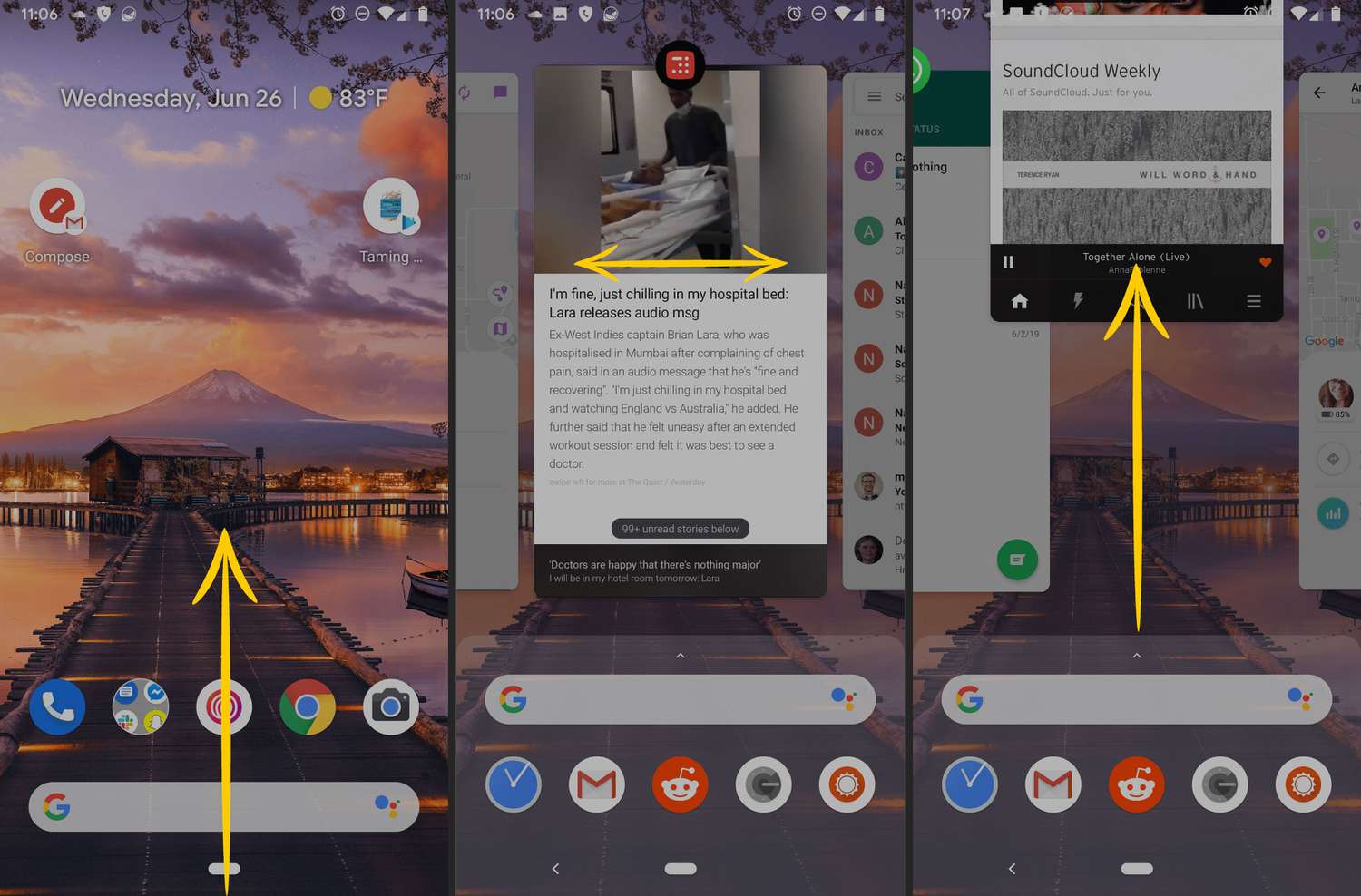
1. Closing Apps Saves Battery Life or Speeds Up the Phone
Myth: Swiping apps out of the Recent list conserves battery and memory.
Reality: Android’s memory manager handles background apps efficiently. Manually closing them forces the system to reload the app when reopened, using more CPU, RAM, and battery in the process.
Experts recommend trusting Android’s multitasking environment and focusing on disabling background permissions for problematic apps instead.
2. Charging Overnight Damages the Battery
Myth: Leaving your phone plugged in overnight leads to battery degradation.
Reality: Modern lithium-ion batteries and charging circuits prevent overcharging by stopping current once fully charged.
That said, keeping the battery at 100% for prolonged periods adds slight wear. Unplug once fully charged to maximize long-term health.
3. Always Let Your Phone Discharge Fully Before Charging
Myth: Fully draining the battery before charging helps prolong battery lifespan.
Reality: This is an old battery guideline. Modern smartphones use lithium-ion batteries that degrade faster when fully discharged.
Experts now recommend charging between 20% and 80% to reduce stress on battery cells.
4. Fast Charging Harms Your Battery
Myth: Using a fast charger shortens battery life.
Reality: Fast charging generates minimal heat, and modern phones include safety measures to protect the battery.
To lessen wear further, use standard charging when not in a hurry and avoid quick cycles late at night.
5. Higher Megapixels Mean Better Photos
Myth: A phone with more megapixels always takes better pictures.
Reality: Image quality is more dependent on sensor size, lens quality, and image processing algorithms.
Phones with fewer megapixels but better sensors and software can outperform higher-resolution competitors.

6. Only Originals or Same-Brand Chargers Are Safe
Myth: Using third-party chargers is dangerous for batteries and devices.
Reality: Certified third-party chargers (USB-IF, QC 3.0, USB-PD) are safe if they meet safety standards.
Problems arise from low-quality or uncertified chargers. Always check for compliance and reputable branding.
7. If It’s in the Play Store, It’s Safe
Myth: Google Play Store apps are always safe and free from malware.
Reality: While safer than unknown sources, the Play Store sometimes hosts malicious apps posing as basic tools.
Users should check reviews, developer credibility, and permission requests, and avoid unnecessary apps.
8. You’ll Instantly Know if Your Phone Is Infected
Myth: Malware instantly shows symptoms like pop-ups or weird behavior.
Reality: Most Android malware acts slowly and silently after infection.
Watch for slow performance, battery or data spikes, and unexpected subscriptions. Factory resets help but advanced threats may require firmware reflashes.
9. Turning Off Wi-Fi/Bluetooth Saves Significant Battery
Myth: Disabling wireless features significantly extends battery.
Reality: Modern chips use very little power when idle. Tests show Bluetooth on drains only around 4% more battery over a day.
It’s better to reduce screen brightness and limit location services to boost battery life effectively.
10. Antivirus Apps Are Essential
Myth: Installing antivirus apps is necessary to stay safe on Android.
Reality: Built-in Google Play Protect and Android’s sandbox model already offer robust malware protection.
AV apps can be intrusive and resource-intensive. User vigilance and secure settings are more effective.
11. You Should Reboot Your Phone Only If There Are Issues
Myth: Rebooting is unnecessary or risky for modern smartphones.
Reality: Restarting clears cached data, snaps system processes back into shape, and may install pending updates .
A weekly reboot is a lightweight way to maintain performance and stability.
Final Advice
Understanding facts behind Android myths helps you use your device intelligently:
- Let Android manage apps and memory.
- Charge smartly without fear of fast or overnight charging.
- Prioritize certified accessories.
- Keep software updated and monitor permissions.
- Stay alert for subtle signs of malware.
Following these guidelines will enhance performance, extend battery life, and make your phone safer in the long term.